02 - IAM: Identity and Access Management
I am an aspiring DevOps Engineer proficient with containers and container orchestration tools like Docker, Kubernetes along with experienced in Infrastructure as code tools and Configuration as code tools, Terraform, Ansible. Well-versed in CICD tool - Jenkins. Have hands-on experience with various AWS and Azure services. I really enjoy learning new things and connecting with people across a range of industries, so don't hesitate to reach out if you'd like to get in touch.
IAM
IAM stands for Identity and Access Management.
It is a Global Service.
Note:
- IAM Query API can be used to make direct calls to the IAM web service (using access key ID and secret access key for authentication)
IAM User and Group
Root account / Root user is created by default when we create AWS account. It is not recommended to use or share the root account.
IAM User is an entity that you can create in AWS for a physical user.
The IAM user represents the human user or workload who uses the IAM user to interact with AWS.
IAM Group is a collection of users. It can only contain users, not other groups.
Users don't necessary have to belong to a Group, and Users can also belong to multiple Groups.
Note:
An IAM Group is not an identity and cannot be identified as a principal in an IAM policy.
Only users and services can assume a role (not groups).
A new IAM user created using the AWS CLI or AWS API has no AWS credentials.
IAM: Permissions
Policies are JSON documents that define the permissions for users, groups or roles.
Follow least privilege principle for IAM Policies: don't give more permissions than a user needs.
Two types:
User based policies
- IAM policies define which API calls should be allowed for a specific user.
Resource based policies
Control access to an AWS resource.
Grant the specified principal permission to perform actions on the resource and define under what conditions this applies.
An IAM principal can access a resource if the user policy ALLOWS it OR the resource policy ALLOWS it AND there’s no explicit DENY
Policies assigned to a user are called inline policies.
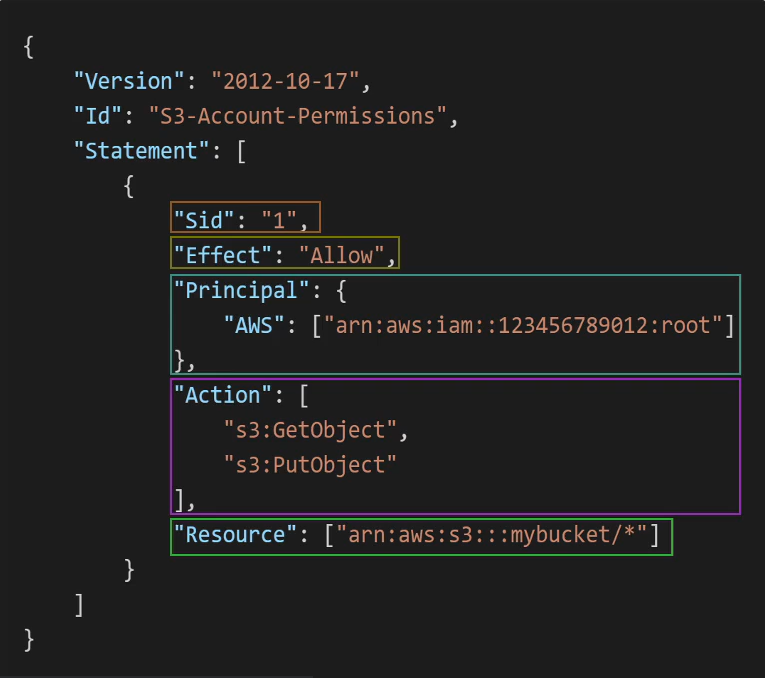
IAM: Policy Structure
Version: policy language version, always include "20112-10-17"
Id: identifier for the policy (optional)
Statement: one or more individual statements (required)
Statement Consists of:
Sid: identifier for the statement (optional)
Effect: whether the statement allows or denies access (Allow, Deny)
Principal: account/user/role to which this policy applied to
Action: list of actions this policy allows or denies
Resource: list of resources to which the actions applied to
Condition: conditions for when this policy is in effect (optional)
IAM: Trust Policies
Defines which principal entities (accounts, users, roles, federated users) can assume the role.
An IAM role is both an identity and a resource that supports resource-based policies.
You must attach both a trust policy and an identity-based policy to an IAM role.
The IAM service supports only one type of resource-based policy called a role trust policy, which is attached to an IAM role.
IAM: Roles
IAM Role is just like a user, but they are intended to be used not by physical people, but instead they will be used by AWS services.
Note:
- If you are going to use an IAM Service Role with Amazon EC2 or another AWS service that uses Amazon EC2, you must store the role in an instance profile. When you create an IAM service role for EC2, the role automatically has EC2 identified as a trusted entity.
Protect IAM Accounts
Password Policy
Use to enforce standards for password
password rotation
password reuse
Prevents brute force attack
Multi Factor Authentication (MFA)
- Both root user and IAM users should use MFA
IAM: Security Tools
IAM Credentials Report (account-level)
- Lists all the users and the status of their credentials (MFA, password rotation, etc.)
IAM Access Advisor (user-level)
Shows the service permissions granted to a user and when those services were last accessed.
Can use to revise the policies.
IAM: Guidelines & Best Practices
Do not use root account except for AWS account setup.
One physical user = One AWS user
Assign users to groups and assign permissions to groups.
Create a strong password policy.
Use and enforce the use of MFA.
Create and use Roles for giving permission to AWS services.
Use Access Keys for programmatic access (CLI/SDK).
Audit permissions of your account using IAM Credentials Report & IAM Access Advisor.
IAM: Policy Simulator
- Online tool that allows us to check what API calls an IAM User, Group or Role is allowed to perform based on the permissions they have.
IAM: Permission Boundaries
Set the maximum permissions an IAM entity can get.
Can be applied to users and roles (not groups).
Used to ensure some users can’t escalate their privileges (make themselves admin).
Use Case:
- Useful to restrict one specific user (instead of a whole account using Organizations & SCP).
IAM: Advanced Policies
IAM Conditions
They apply to policies within IAM (Users, Resource policy, Endpoint policy, etc.)
aws:SourceIP
- Restrict the client IP from which the API calls are being made
aws:RequestedRegion
- Restrict the region the API calls are made to
ec2:ResourceTag
- Restrict based on tags
aws:MultiFactorAuthPresent
- To force MFA
IAM for S3
Bucket level permission
- s3:ListBucket permission applies to arn:aws:s3:::test
Object level permission
- s3:GetObject, s3:PutObject, s3:DeleteObject applies to arn:awn:s3:::test/*

Resource Policies & aws:PrincipalOrgID
- aws:PrincipalOrgID can be used in any resource policies to restrict access to accounts that are member of an AWS Organization
IAM Role vs Resource based Policy
Cross Account:
attaching a resource-based policy to a resource (example: S3 bucket policy)
OR using a role as a proxy

When you assume an IAM Role, you give up your original permissions and take the permissions assigned to the role
When using a resource based policy, the principal doesn’t have to give up their permissions
Amazon EventBridge – Security
Resource-based policy: Lambda, SNS, SQS, S3 buckets, API Gateway…
IAM role: EC2 Auto Scaling, Systems Manager Run Command, ECS task…
AWS IAM Identity Center
Successor of AWS Single Sign-On
Provides One login (single sign-on) for all your:
AWS accounts in AWS Organizations
Business cloud applications (e.g., Salesforce, Box, Microsoft 365, …)
SAML2.0-enabled applications
EC2 Windows Instances
Identity Providers - where users are stored for the SSO login
Built-in identity store in IAM Identity Center
3rd party: Active Directory (AD), OneLogin, Okta, etc.
Fine-grained Permissions and Assignments
Multi-Account Permissions
Manage access across AWS accounts in your AWS Organization
Permission Sets – a collection of one or more IAM Policies assigned to users and groups to define AWS access
Application Assignments
SSO access to many SAML 2.0 business applications (Salesforce, Box, Microsoft 365, …)
Provide required URLs, certificates, and metadata
Attribute-Based Access Control (ABAC)
Fine-grained permissions based on users’ attributes stored in IAM Identity Center Identity Store
Example: cost center, title, locale, …
Use case: Define permissions once, then modify AWS access by changing the attributes
AWS Access Keys, CLI and SDK
How can users access AWS?
There are 3 options:
AWS Management Console: protected by password + MFA
AWS Command Line Interface (CLI): protected by access keys
AWS Software Development Kit (SDK)- for code: protected by access keys
Access keys are generated through AWS Console.
Access Key ~= username
Secret Access Key ~= password
AWS CLI
A tool that enables you to interact with AWS services using commands in your command-line shell.
Direct access to the public APIs of AWS services.
You can develop script to manage your resources.
It's open source: aws-cli
It's an alternative to using AWS Management Console.
AWS SDK
AWS SDK stands for Software Development Kit
Language specific APIs (set of libraries)
Enables you to access and manage AWS services programmatically.
Embedded within your application.
Supports: JS, Python, PHP, .NET, Ruby, Java, Go, Node.JS, C++.
Example: AWS CLI is build on AWS SDK for Python (boto3).